Reports
Download a filtered view instead of compiling spreadsheets manually.
Sign in with your own approved account. Open Reports through the sidebar or Master setup. Some actions require administrator/manager permission. Screens use anonymized test data; sample totals are not your company results.
What to do
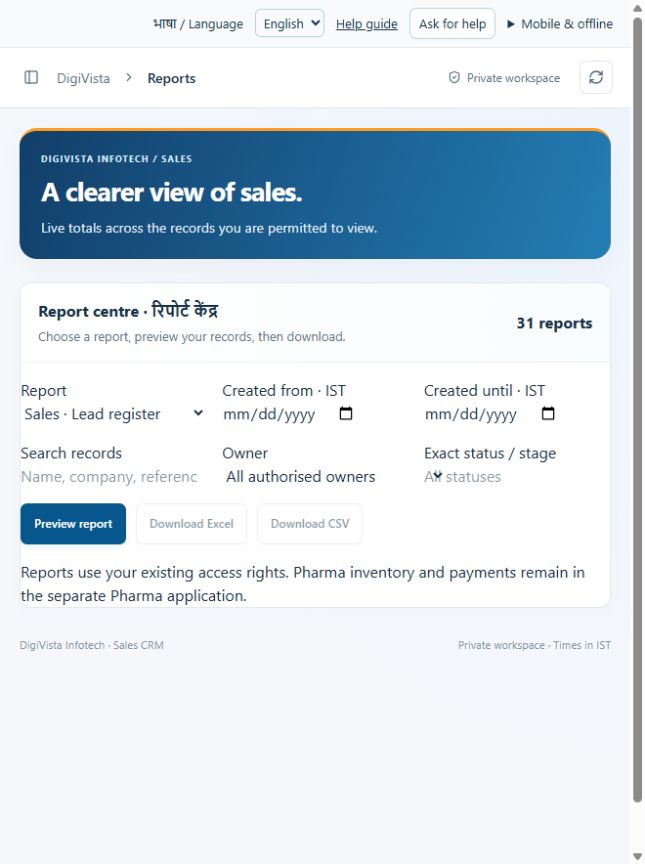
- Select the report type and creation-date range in IST.
- Apply search and relevant filters; preview the rows and totals.
- Download CSV or Excel and compare the export with the preview and source records.
Check the result
The export reflects permitted, filtered records. Review record limits and metric definitions.
Screen markers
- 1. ReportSales · Lead registerSales · Pipeline by stageSales · Lead …
- 2. Created from · IST
- 3. Created until · IST
On narrow screens, scroll to reach the remaining form fields and actions. Close help to return to your unfinished form.
Why and how this activity works
Open Import and export. Lead import supports reviewed create/update modes. For companies, contacts and opportunities download a template, enter new records, upload Excel or CSV, review row validation and confirm ready rows. Services update requires admin and current expectedVersion. Limit 100 rows and 2 MB per file. Existing identities and repeated rows are flagged. Successful rows are saved separately; invalid rows are skipped. Download row results. Under Reports choose from 31 report types, filter and preview, then download CSV or Excel. Counts and downloads follow role permissions. Dates use record creation in IST, not activity or expected-close dates. Exports exceeding 10,000 source records are rejected instead of silently truncated.
हिन्दी में समझें
Import and export में template लें, डेटा भरें और Excel या CSV अपलोड करें। Preview में गलत या दोहराई हुई पंक्ति देखें। सही पंक्तियाँ confirm करने पर save होंगी। प्रति file 100 पंक्तियाँ और 2 MB सीमा है। पुरानी service rate बदलने के लिए Admin और expectedVersion जरूरी हैं। Reports से 31 प्रकार की रिपोर्ट खोजें, filter लगाएँ और Excel या CSV डाउनलोड करें।
If something is missing or fails
Check role access, selected record and filters. Read validation errors before retrying. For a conflicting edit, refresh and review the current record. A saved setting does not prove a provider connection is active.
Full topic and field help · All screen guides · Learning centre