Recycle bin
Recover supported leads after a reviewed removal.
Sign in with your own approved account. Open Recycle bin through the sidebar or Master setup. Some actions require administrator/manager permission. Screens use anonymized test data; sample totals are not your company results.
What to do
- Review the lead before using Move a lead to the recycle bin.
- Choose Refresh and inspect recoverable entries.
- Choose Restore for the intended recoverable lead, then confirm it returns to the lead book.
Check the result
A restored lead is available again; merged sources are not treated as ordinary recovery entries.
Screen markers
- 1. Refresh
- 2. Move a lead to the recycle bin
- 3. Restore
On narrow screens, scroll to reach the remaining form fields and actions. Close help to return to your unfinished form.
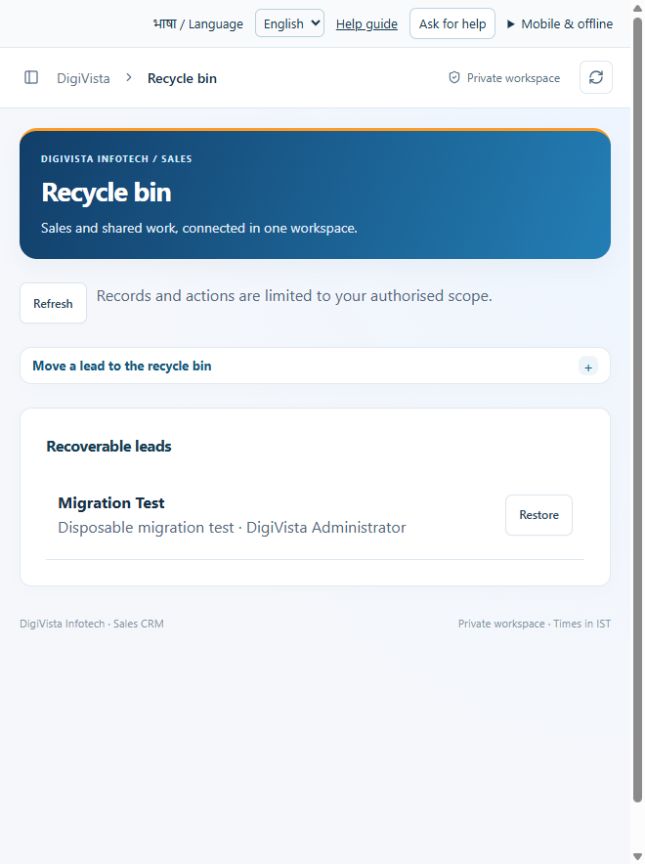
Why and how this activity works
Move a lead to the recycle bin only after review; its identity remains reserved and related work is hidden. Restore supported recoverable leads. Merged source leads are not ordinary restoration entries. Administrator backup exports a workspace snapshot containing personal data. Restrict and protect the file. Restoration is an engineer-operated procedure into a new database and must be tested; this application does not supply automatic offsite encrypted backups.
हिन्दी में समझें
लीड हटाने से पहले जाँचें। हटाई गई सूची से योग्य लीड वापस ला सकते हैं। उसकी संपर्क पहचान बचती है और जुड़ा काम छिपता है। जो स्रोत लीड दूसरी से मिल गई हो, वह सामान्य बहाली सूची में नहीं आती। एडमिन बैकअप डाउनलोड करे और सुरक्षित रखे; उसमें ग्राहक डेटा है। इंजीनियर नए डेटाबेस में उसे वापस लाएगा। बहाली जाँचनी होगी; अपने-आप ऑफ़साइट बैकअप अभी नहीं है।
If something is missing or fails
Check role access, selected record and filters. Read validation errors before retrying. For a conflicting edit, refresh and review the current record. A saved setting does not prove a provider connection is active.
Full topic and field help · All screen guides · Learning centre