Quotations
Create a consistent quotation using saved masters.
Sign in with your own approved account. Open Quotations through the sidebar or Master setup. Some actions require administrator/manager permission. Screens use anonymized test data; sample totals are not your company results.
What to do
- Expand Create quotation and select the company and linked customer lead.
- Select configured items/services, then review description, quantity, HSN/SAC, tax, rate, validity and terms.
- Save the draft, inspect Printable quotation and submit for approval; use the permitted send action only after approval.
Check the result
The saved quotation retains its item/tax snapshot and correct approval state. Check the sending result separately.
Screen markers
- 1. Refresh
- 2. Create quotation
On narrow screens, scroll to reach the remaining form fields and actions. Close help to return to your unfinished form.
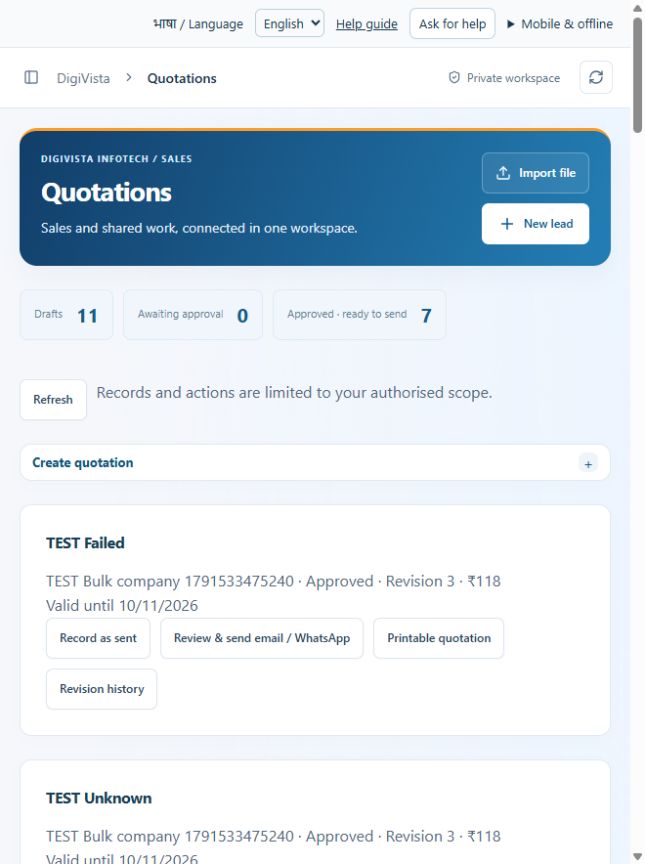
Why and how this activity works
Create the company account first and link its customer lead in Companies & contacts. In Quotations choose company and customer lead, enter a title and validity date. Select services from the catalogue; each selection adds an editable item with preset description/rate/tax. Adjust scope, quantity, price and tax and add agreed terms. Save the draft, review the printable quotation and submit for approval. A zero-total quotation is blocked. Up to 50 items are supported. Catalogue edits affect new selections; saved quotations keep their own agreed snapshot.
हिन्दी में समझें
पहले कंपनी बनाएँ और ग्राहक लीड उससे जोड़ें। कोटेशन में कंपनी, ग्राहक, शीर्षक और आखिरी वैध तारीख चुनें। सूची से सेवा जोड़ें। विवरण, मात्रा, कीमत, टैक्स और शर्तें बदल सकते हैं। ड्राफ्ट सहेजें, प्रिंट देखकर जाँचें और मैनेजर को मंज़ूरी के लिए भेजें। कुल कीमत शून्य हो तो सहेजना बंद होगा। अधिकतम 50 सेवाएँ जोड़ सकते हैं। नई सूची कीमत पुराने सहेजे कोटेशन को नहीं बदलती।
If something is missing or fails
Check role access, selected record and filters. Read validation errors before retrying. For a conflicting edit, refresh and review the current record. A saved setting does not prove a provider connection is active.
Full topic and field help · All screen guides · Learning centre