Pipeline
See where conversations are progressing or stuck.
Sign in with your own approved account. Open Pipeline through the sidebar or Master setup. Some actions require administrator/manager permission. Screens use anonymized test data; sample totals are not your company results.
What to do
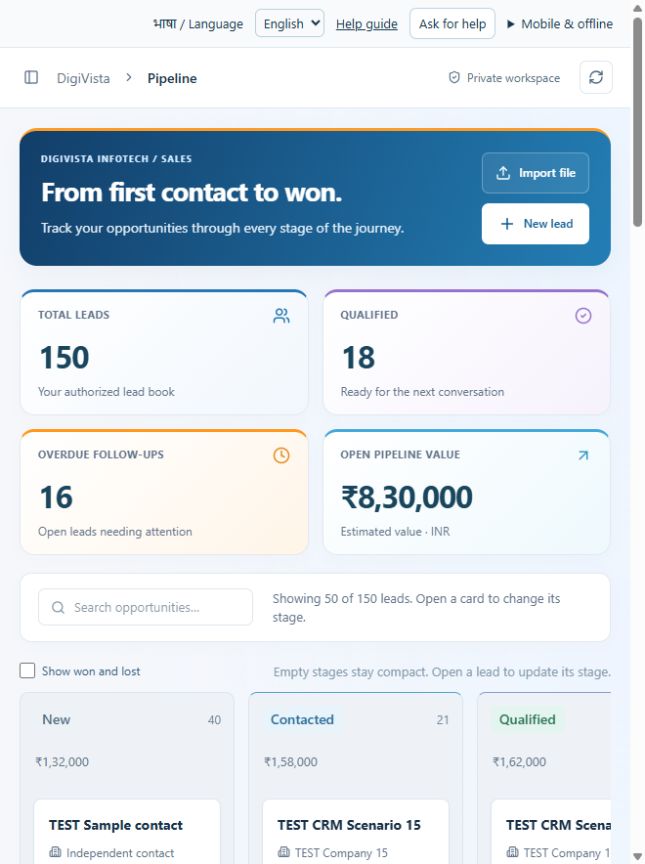
- Search the pipeline and optionally include Won/Lost.
- Open a lead card in the relevant stage.
- Review and update its stage through the lead form, record the reason and next action.
Check the result
The refreshed card appears in its intended stage. Pipeline value remains an estimate.
Screen markers
- 1. Search pipeline
- 2. Show won and lost
On narrow screens, scroll to reach the remaining form fields and actions. Close help to return to your unfinished form.
Why and how this activity works
Open Pipeline to see leads by stage within your authorised scope. Open a lead to review its contact, owner, value and next follow-up. Update its stage using the lead form; respect your role permissions. Record the conversation and next action. Pipeline values are estimates, not invoiced revenue.
हिन्दी में समझें
Pipeline खोलकर हर कदम की लीड देखें। लीड खोलें और संपर्क, ज़िम्मेदार व्यक्ति, रकम और अगला संपर्क जाँचें। अपनी अनुमति के अनुसार फ़ॉर्म से बिक्री का कदम बदलें। बातचीत और अगला काम लिखें। पाइपलाइन रकम अनुमान है, बिल की रकम नहीं।
If something is missing or fails
Check role access, selected record and filters. Read validation errors before retrying. For a conflicting edit, refresh and review the current record. A saved setting does not prove a provider connection is active.
Full topic and field help · All screen guides · Learning centre