Inbox
Review incoming enquiries before creating leads.
Sign in with your own approved account. Open Inbox through the sidebar or Master setup. Some actions require administrator/manager permission. Screens use anonymized test data; sample totals are not your company results.
What to do
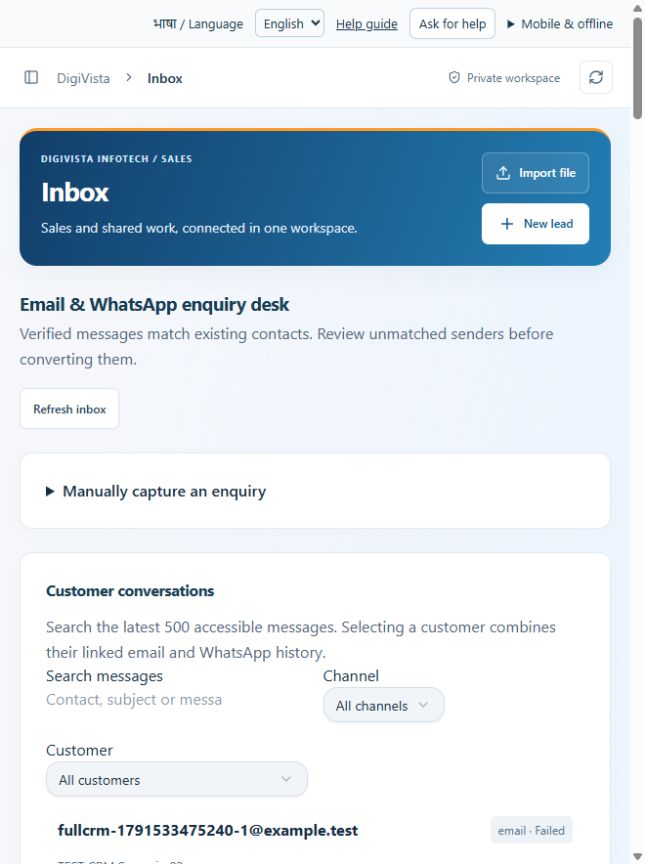
- Choose Refresh inbox and filter channel or customer.
- Open the captured enquiry and review its contact and context.
- For unmatched enquiries, confirm the appropriate Convert to lead action and verify the created or matched lead.
Check the result
The enquiry is associated with the right lead. Provider setup is required for automatic incoming capture.
Screen markers
- 1. Refresh inbox
- 2. Manually capture an enquiry
On narrow screens, scroll to reach the remaining form fields and actions. Close help to return to your unfinished form.
Why and how this activity works
Enquiry desk shows captured messages. Verified inbound adapters match contacts; unmatched enquiries need review before Convert to lead. Incoming enquiries do not grant marketing permission. Email capture needs the mailbox provider or a signed forwarding bridge; existing mailbox sync is not active. WhatsApp capture requires official Business Platform credentials and webhooks. Saving info@digivistainfotech.com or +919871605170 as company details does not connect those accounts. Administrators can change both later with corresponding provider verification.
हिन्दी में समझें
इनबॉक्स में प्राप्त पूछताछ देखें। सही कनेक्शन के बाद संदेश पुराने संपर्क से मिलते हैं। नया संपर्क हो तो जाँचकर लीड बनाएँ। इससे मार्केटिंग की अनुमति नहीं मिलती। ईमेल लेने के लिए मेलबॉक्स या सुरक्षित फ़ॉरवर्डिंग और व्हाट्सऐप के लिए आधिकारिक बिज़नेस एपीआई चाहिए। कंपनी का ईमेल या फोन लिख देने से वह खाता नहीं जुड़ता। एडमिन बाद में सही सेटअप के साथ दोनों बदल सकता है।
If something is missing or fails
Check role access, selected record and filters. Read validation errors before retrying. For a conflicting edit, refresh and review the current record. A saved setting does not prove a provider connection is active.
Full topic and field help · All screen guides · Learning centre