Campaigns
Prepare an audience and message with exclusions reviewed.
Sign in with your own approved account. Open Campaigns through the sidebar or Master setup. Some actions require administrator/manager permission. Screens use anonymized test data; sample totals are not your company results.
What to do
- Record channel permission and supporting evidence where applicable.
- Create a campaign with channel, audience and message; preview exclusions and personalised content.
- Prepare the campaign. Sending requires verified providers and an allowed administrator action; review actual delivery statuses.
Check the result
Prepared recipients are reviewed. Preparation or provider acceptance is not proof of delivery.
Screen markers
- 1. Record channel permission
- 2. Campaign name
On narrow screens, scroll to reach the remaining form fields and actions. Close help to return to your unfinished form.
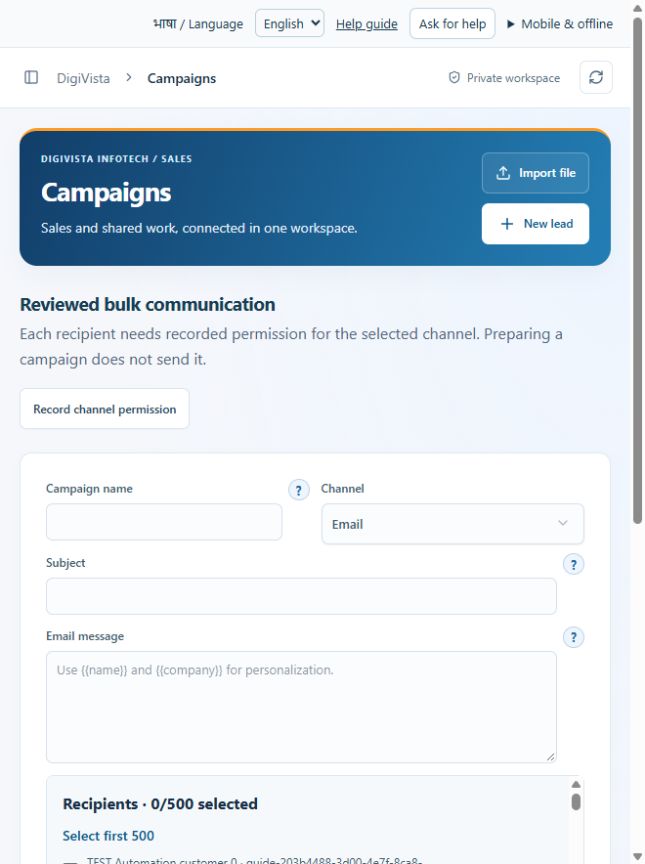
Why and how this activity works
Record permission and evidence per channel. Review audience exclusions, personalise with {{name}} / {{company}}, then prepare a campaign. Preparing does not send. Sending requires verified providers, server secrets, enablement and a reachable opt-out endpoint. Only the allowed role can send the next batch; cancelled queued recipients will not send. Provider Accepted does not mean Delivered. Uncertain sending results need investigation rather than blind retries. No live provider has been verified in this preview.
हिन्दी में समझें
ईमेल और व्हाट्सऐप के लिए ग्राहक की अलग अनुमति और प्रमाण रखें। देखें किसको संदेश जाएगा और कौन बाहर है। {{name}} और {{company}} से नाम भर सकते हैं। अभियान बनाने से संदेश नहीं जाता। भेजने के लिए सही प्रदाता, सर्वर कुंजी, चालू सेटअप और संदेश बंद करने का विकल्प चाहिए। अधिकृत कर्मचारी ही बैच भेज सकता है। रद्द कतार नहीं भेजी जाती। प्रदाता ने संदेश ले लिया, इसका मतलब ग्राहक तक पहुँचा नहीं है। परिणाम साफ न हो तो जाँचें, बिना जाँचे दोबारा न भेजें। अभी लाइव प्रदाता जाँचा नहीं गया है।
If something is missing or fails
Check role access, selected record and filters. Read validation errors before retrying. For a conflicting edit, refresh and review the current record. A saved setting does not prove a provider connection is active.
Full topic and field help · All screen guides · Learning centre