Automation
Reduce repeated assignment and reminder work.
Sign in with your own approved account. Open Automation through the sidebar or Master setup. Some actions require administrator/manager permission. Screens use anonymized test data; sample totals are not your company results.
What to do
- As administrator, enter rule name, matching source/industry, owner and follow-up hours.
- Enable and save the rule; verify its effect using a new test lead.
- Use Run reminders now and check notifications; unattended operation requires an external scheduler.
Check the result
A matching new lead receives the intended default; explicit manual choices take priority.
Screen markers
- 1. How matching rules work
- 2. Rule name
- 3. Lead source
On narrow screens, scroll to reach the remaining form fields and actions. Close help to return to your unfinished form.
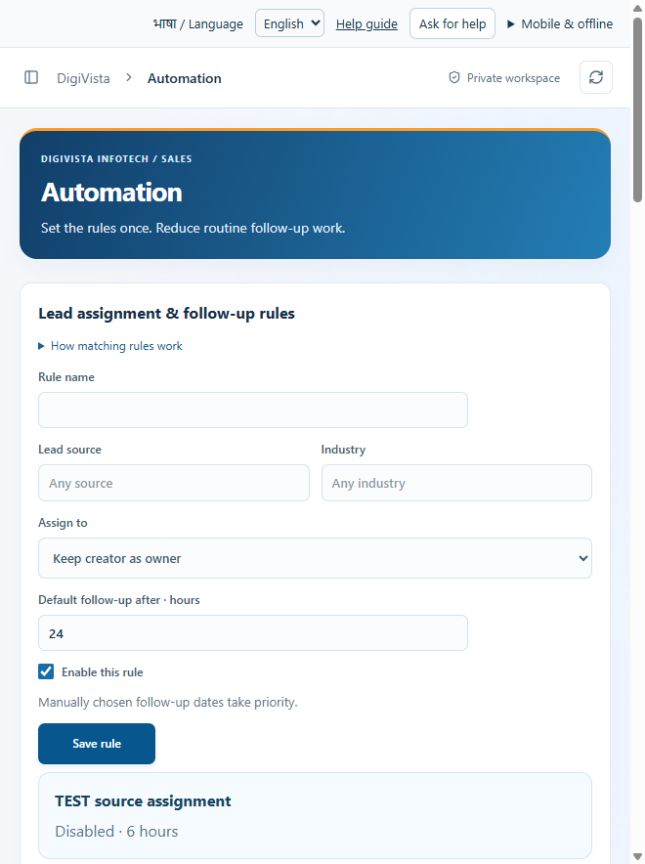
Why and how this activity works
Admin opens Reports and automation > Automation. Set source, industry, sales owner and follow-up hours. Blank condition matches any lead; the latest matching enabled rule wins. Rules apply to new leads, including incoming leads when auto-capture is enabled. Manual owner and explicit follow-up dates override defaults. Run reminders now creates one in-app reminder per overdue task/person/day; a reporting manager is notified after 24 hours overdue. Reminders run every five minutes while an admin has CRM open. For unattended runs configure an external scheduler with the private job credential. This feature does not send emails or WhatsApp messages automatically.
हिन्दी में समझें
Admin Automation में स्रोत, उद्योग, जिम्मेदार व्यक्ति और follow-up के घंटे तय करे। नए lead पर नियम लगेगा। हाथ से चुना व्यक्ति या तारीख नहीं बदलेगी। Run reminders से देर वाले काम की सूचना बनती है। हर व्यक्ति को रोज एक सूचना मिलती है। 24 घंटे देर होने पर reporting manager को भी सूचना मिलती है। अपने आप रोज चलाने के लिए scheduler सेट करना जरूरी है।
If something is missing or fails
Check role access, selected record and filters. Read validation errors before retrying. For a conflicting edit, refresh and review the current record. A saved setting does not prove a provider connection is active.
Full topic and field help · All screen guides · Learning centre